styles on js
const h1 = document.querySelector(".hello h1");

function handleTitleClick() {
    const currentColor = h1.style.color;
    let newColor;
    if(currentColor === "blue") {
        newColor = "tomato";
    } else {
        newColor = "blue";
    }
    h1.style.color = newColor;
}

h1.addEventListener("click", handleTitleClick);
JS - HTML - CSS
스타일은 css
/* CSS */
body {
    background-color: beige;
}

h1 {
    color: cornflowerblue;
}

.active {
    color: tomato;
}
// JS //
const h1 = document.querySelector(".hello h1");
function handleTitleClick() {
h1.className = "active";
}
h1.addEventListener("click", handleTitleClick);
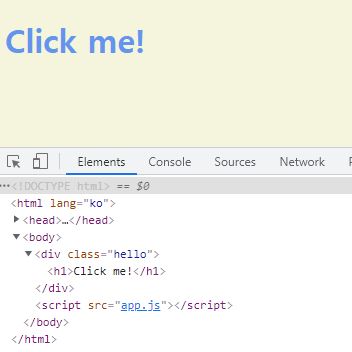
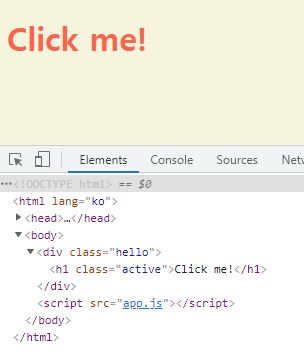
이벤트 발생 시 <h1> 태그에 class = "active"가 생성되며 스타일 변화
* if-else를 이용하여 다시 클릭하면 문자의 색이 돌아오도록 만듦
const h1 = document.querySelector(".hello h1");

function handleTitleClick() {
    const clickedClass = "active";
    if(h1.className === clickedClass) {
        h1.className = "";
    } else {
        h1.className = clickedClass;
    }
}

h1.addEventListener("click", handleTitleClick);
classList
- element의 class 내용물을 조작하는 것을 허용
const h1 = document.querySelector(".hello h1");

function handleTitleClick() {
    const clickedClass = "active";
    if(h1.classList.contains(clickedClass)) {
        h1.classList.remove(clickedClass);
    } else {
        h1.classList.add(clickedClass);
    }
}

h1.addEventListener("click", handleTitleClick);

// className이 추가되었다 없어졌다 함
toggle
- class name이 존재하는지 확인하고 추가/삭제 함
- 위 코드의 if-else를 대체할 수 있음
const h1 = document.querySelector(".hello h1");

function handleTitleClick() {
    h1.classList.toggle("active");
}

h1.addEventListener("click", handleTitleClick);

// class list에 active class가 있으면 삭제하고 없으면 추가함
'개발 > JavaScript' 카테고리의 다른 글
| 바닐라 JS - 앱 만들기 username (0) | 2021.08.27 |
|---|---|
| 바닐라 JS - 앱 만들기 input, prevent 1 (0) | 2021.08.26 |
| 바닐라 JS - Events (0) | 2021.08.25 |
| 바닐라 JS - document object (0) | 2021.08.23 |
| 바닐라 JS - Conditionals (0) | 2021.08.10 |


