1탄 - https://jaajaa.tistory.com/297
[SpringBoot] 이메일 전송(텍스트, html)
결제가 완료되면 결제 정보 및 신청 내역을 메일로 전송하려고 한다. 메일은 html 형식으로 보낸다. gmail, thymeleaf와 spring-boot-starter-mail을 이용한다. springboot 2.1.4 java 8 설정 의존성 추가 // email 발송
jaajaa.tistory.com
발신 주소가 네이버 메일로 바뀌어서 수정이 필요
구글과 약간 다른 점이 있어서 따로 포스트를 작성한다.
spring:
  mail:
    default-encoding: UTF-8
    host: smtp.naver.com
    port: 465
    username: test@naver.com
    password: test
    properties:
      mail:
        smtp:
          auth: true
          starttls:
            enable: true
          ssl:
            enable: true
            trust: smtp.naver.com
1. 네이버 메일에 접속하여 환경설정 > POP3/SMPT 설정 > 사용함 체크
2. 설정 화면 하단에 SMTP 서버명, SMTP 포트를 프로젝트 yml 파일에 작성한다.
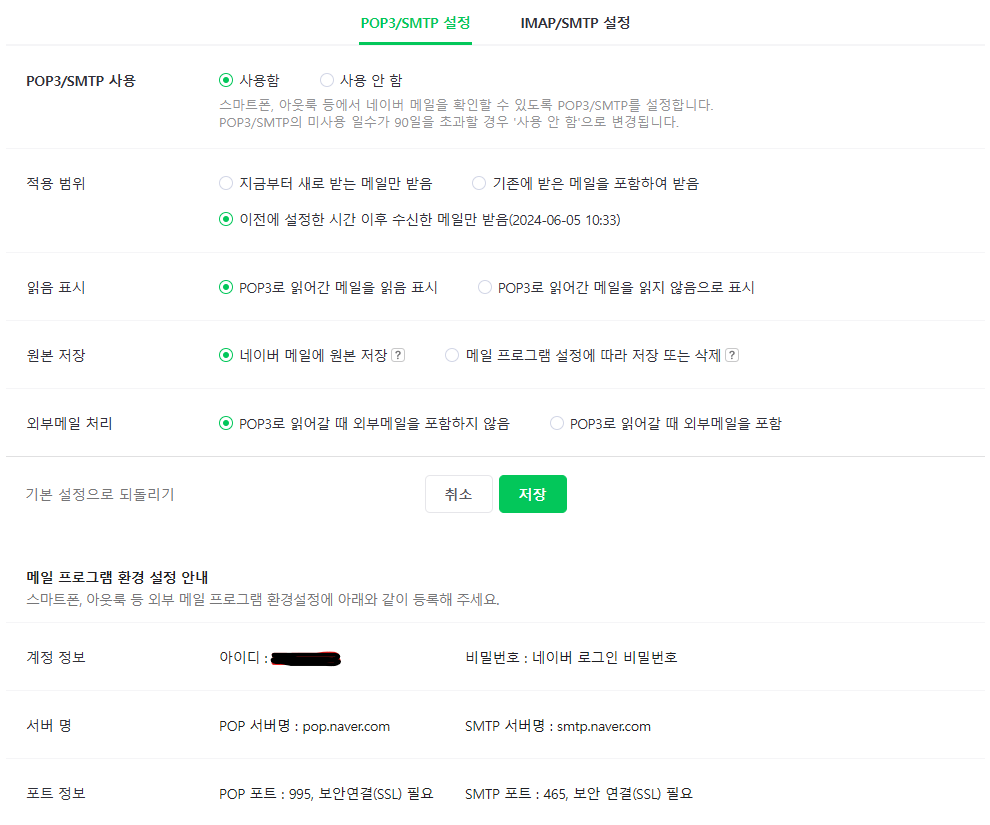
문제 1
Could not connect to SMTP host smtp.naver.com, port 465, response -1
yml 설정에서 구글 메일 전송에서는 auth와 starttls 설정만 해주면 됐는데 네이버에서는 아래 설정이 없으면 위 에러가 발생한다. ssl 사용 설정
mail.smtp.ssl.enable: true
mail.smtp.ssl.trust: smtp.naver.com
문제 2
the sender address is unauthorized nsmtp
구글에서는 메일을 보낼 때 발신인 주소를 명시하지 않아도 yml에 설정한 username이 from으로 설정이 되는데, 네이버는 꼭 값을 넣어줘야 한다.
MimeMessageHelper helper = new MimeMessageHelper(message, true, "UTF-8");
...
helper.setFrom(FROM); // FROM: 발신인 메일 주소
참고
https://m.blog.naver.com/jhee10101/221734145404
https://ongjiny.tistory.com/11
'개발 > Spring' 카테고리의 다른 글
| 토비의 스프링 - 서비스 추상화 (0) | 2024.10.25 |
|---|---|
| [Querydsl] PageableExecutionUtils count query 오류 (0) | 2024.10.20 |
| Swagger 적용(2.3.0) (0) | 2024.04.17 |
| [batch] spring boot3에서 배치 실행이 안됨 (1) | 2024.02.08 |
| 외부 api 연동하기(retrofit2, form urlencoded) (0) | 2023.12.14 |
