Geolocation
- user의 location을 전달받아 날씨 정보를 줌
navigator.geolocation.getCurrentPosition(sucess function, error function, [option]);
- MDN
function onGeoOk(position){
    const lat = position.coords.latitude;
    const lon = position.coords.longitude;
    console.log("You live in", lat, lng);
}

function onGeoError(){
    alert("Can't find you. No weather for you.");
}

navigator.geolocation.getCurrentPosition(onGeoOk, onGeoError);
GeolocationPosition의 element를 확인하여 위도, 경도(latitude, longitude) 불러오기
API를 이용해 위도, 경도로 현재 위치 이름과 날씨를 불러와야 함
Weather API
- API: 다른 서버와 이야기할 수 있는 방법
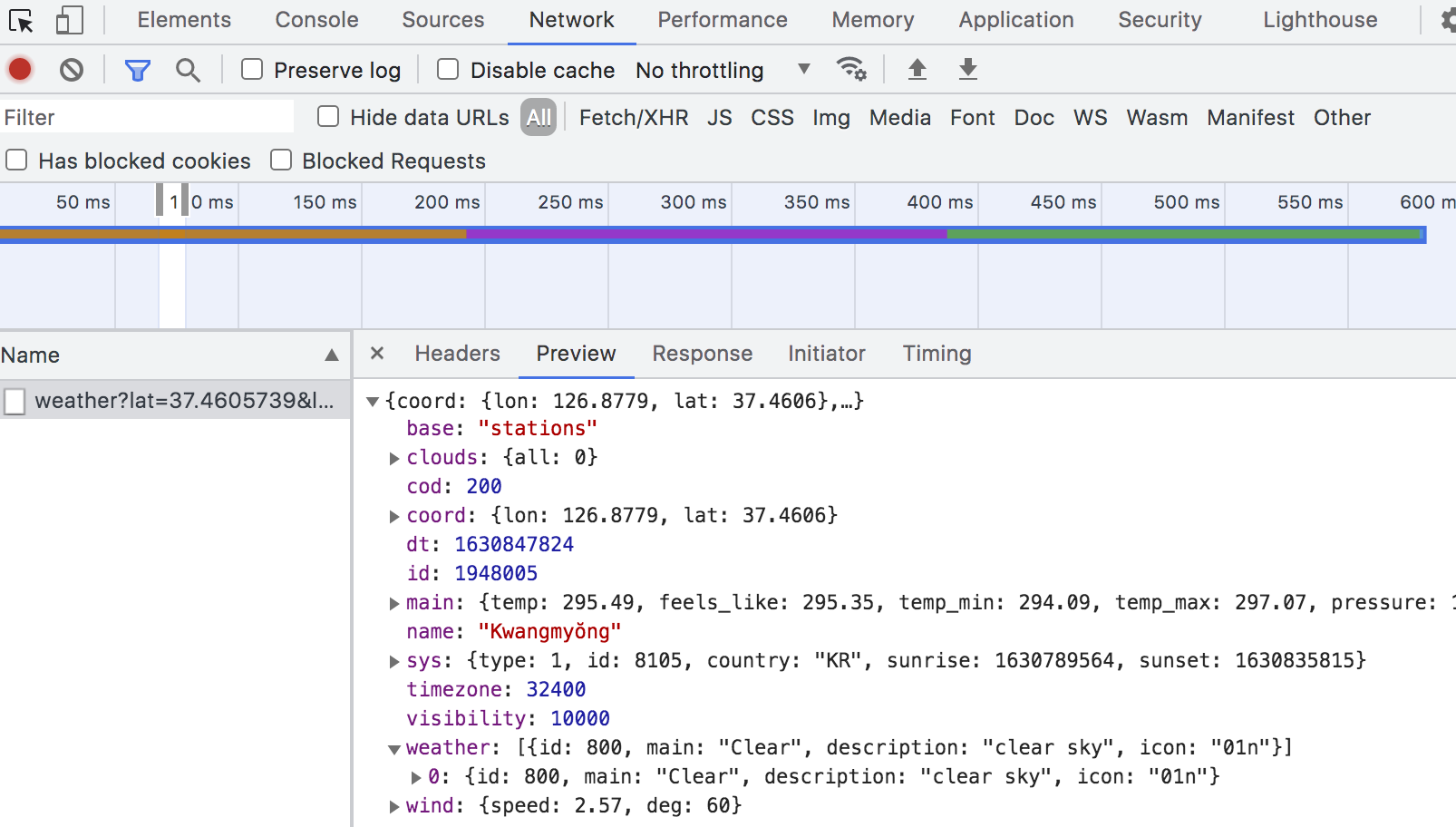
url에서 우리에게 필요한 값을 확인 - name, weather or main에 있는 온도, 습도, 기압 등 활용할 수 있는 정보
const API_KEY = "33d0cfa225abc4eec7758f539760a743";

function onGeoOk(position){
    const lat = position.coords.latitude;
    const lon = position.coords.longitude;
    const url = `https://api.openweathermap.org/data/2.5/weather?lat=${lat}&lon=${lon}&appid=${API_KEY}&units=metric`
    fetch(url)
        .then((response) => response.json())
        .then((data) => {
            const weather = document.querySelector("#weather span:first-child");
            const city = document.querySelector("#weather span:last-child");
            city.innerText = data.name;
            weather.innerText = `${data.weather[0].main} / ${Math.round(data.main.temp)}도`;
    });
}

function onGeoError(){
    alert("Can't find you. No weather for you.");
}

navigator.geolocation.getCurrentPosition(onGeoOk, onGeoError);
'개발 > JavaScript' 카테고리의 다른 글
| 테트리스 게임 만들기 (0) | 2021.09.17 |
|---|---|
| 바닐라JS - 앱 만들기 챌린지 끝 (0) | 2021.09.06 |
| 바닐라JS - 앱 만들기 to do list 2 (0) | 2021.09.05 |
| 바닐라JS - 앱 만들기 to do list (0) | 2021.09.05 |
| 바닐라JS - 앱 만들기 randomness (0) | 2021.09.02 |


